
TL;DR– VPNs don’t make you as anonymous as many people often believe. They keep the data you send and receive secure and private. Governments or websites can still track you through your accounts, cookies, payment records and device data. VPNs create a secure tunnel and encrypt data with keys that change frequently, so that no one can read your data in transit. We should choose a safe VPN depending on verifyable safety signals, not marketing claims.

My friend Scott was a big privacy nut. To give some perspective he was the kind of guy who used to stick a piece of tape on his laptop’s webcam.
One day his favourite YouTuber ended his video with a ‘public message’ on why we should use a VPN – how VPNs keep our data secure and how they protect us from tracking by companies and governments – the usual VPN marketing claims. The VPN company was also generously offering a 20% discount on a 2 year plan to all his subscribers.
“Sweet,” thought Scott.
Now, my man Scott wasn’t a person who would pass up a great bargain like that. He immediately subscribed.
One day, Scott watched some videos on YouTube about pressure washers. He started reading a random blog and suddenly froze. Sandwiched between paragraphs were ads for pressure washers.
“How?” he thought. “I’m using a VPN.”
What’s a VPN?
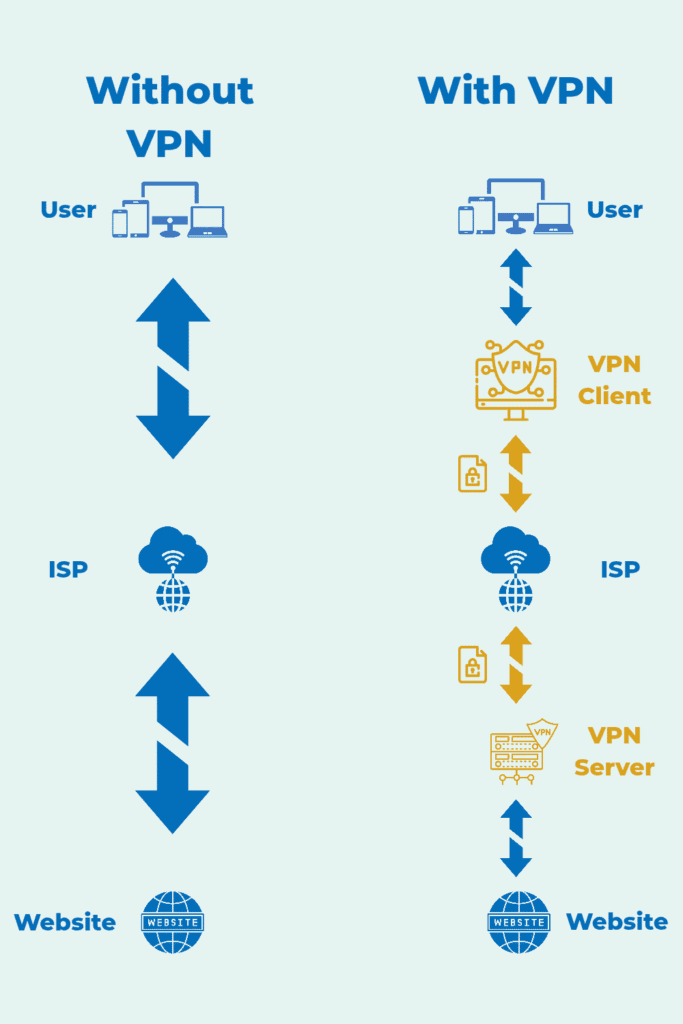
VPN (Virtual Private Network) encrypts and routes your Internet traffic via a VPN server. Think of it this way. A VPN creates a private data tunnel from your device to the VPN server. Your data is encrypted, sent and received through these tunnels. No one can see the data in these tunnels. The website never sees your original IP address but instead sees the VPN server’s IP. This doesn’t actually give you anonymity as they can track you by other means. But a VPN prevents your local network/ISP from seeing which destinations you connect to and what you do online by encrypting traffic and routing it through the VPN server.
How VPNs work?
Step 1 – Handshake
The VPN handshake is the first conversation between your device and the VPN server. Here, the VPN client (app) and the VPN server establish the parameters required for a secure tunnel.
Step 2 – Authentication
The next step is authentication. Your device verifies the server’s identity by using digital certificates, public keys or signatures, depending on the protocol. Some protocols allow mutual authentication. This ensures that the VPN server you are connected to is genuine.
Step 3 – Key Exchange
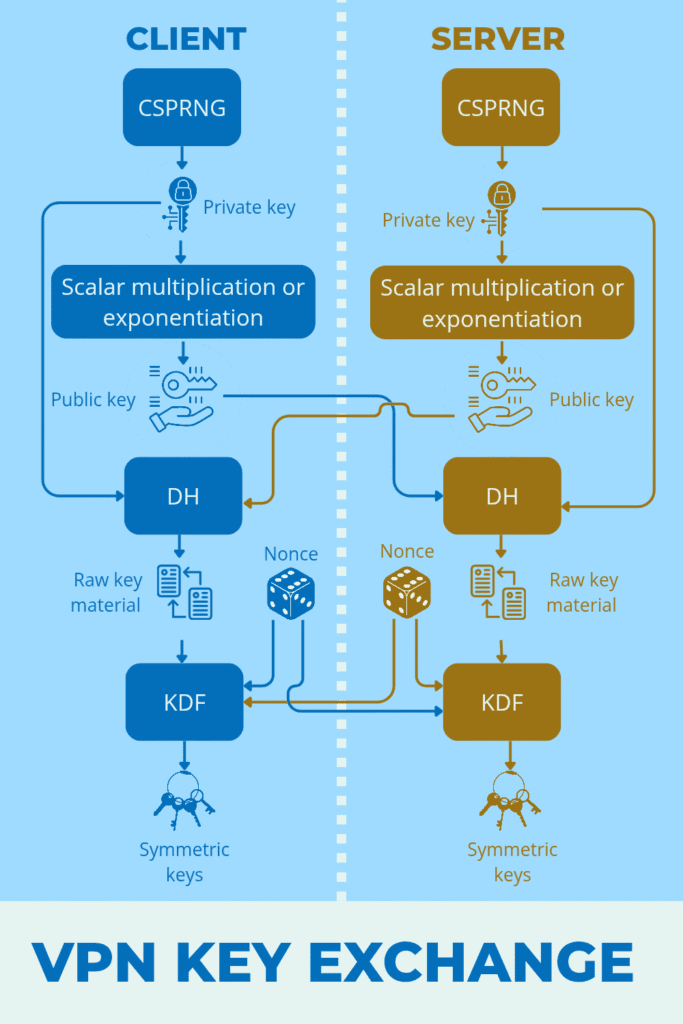
A private key is randomly generated on the server and the client using a CSPRNG (Cryptographically Secure Pseudo-Random Number Generator). The public key is then computed from private key by scalar multiplication or exponentiation. Once generated, the public keys are exchanged between the server and client.
Raw key material is generated using a DH operation with the public key received from the other and the party’s own private key. Then nonces, unique random cryptographic numbers, are generated on both sides.
Symmetric keys are then derived on both sides for data encryption, packet authentication and handshake integrity by applying a KDF operation to the raw key material and the nonces generated at both ends.
Step 4 – Perfect Forward Secrecy
Perfect Forward Secrecy means your past VPN data stays protected even if today’s keys ever got leaked. Once the symmetric keys are generated, the temporary keys used during their creation are immediately deleted. Because these temporary keys are never reused or stored, no one can reconstruct the shared secret or the session keys later.
Step 5 – Tunnel creation
The VPN will then create a virtual network interface at the two ends. This interface behaves like a real network card. The OS will now start routing all internet traffic through this, but LAN traffic will be kept out. It will be like a tunnel with two cryptographic lanes – one allowing data transfer from client to server and the other allowing data transfer from server to client. Each lane/direction has an encryption key, an authentication key, a sequence number, replay-protection logic and packet size/MTU rules.
Step 6 – Encryption
An IP packet from by your device now enters the virtual network interface instead of going directly to the ISP. VPN first encapsulates it into a VPN-specific packet structure. Then it encrypts the encapsulated packet with the symmetric encryption key.
After encryption, an authentication tag is added using the packet authentication key. A sequence number or counter is also added to this packet. This prevents anyone from reordering or adding any fraudulent packets to the data while in transit. Metadata is also attached to the packet.
Now the message is encrypted. Your ISP can only see your encrypted data and the VPN server’s IP as your destination.
Only the VPN server can now decrypt this data. So the VPN server decrypts the data and sends it to the website. As a result, websites can only see the VPN server’s IP and not your real IP.
As for the return traffic, the same operations are performed by the server and message is decrypted on your device by the client.
Step 7 – Rekeying
Even after the connection is established, the same encryption key isn’t used indefinitely. This is because if the symmetric keys get exposed at any stage, it could be used to decrypt all the data that was encrypted using those keys. Attackers might even get time to analyze patterns and decrypt all our future data successfully if the keys remain unchanged.
Rekeying performs a faster key exchange deriving new symmetric keys. According to the VPN protocol used, the switch-over moment is negotiated between the client and server. Then at the same time or technically at the same sequence number or timer, the keys are switched over. The old keys are immediately deleted. This process happens in the background without affecting the tunnel.
Major VPN Protocols explained
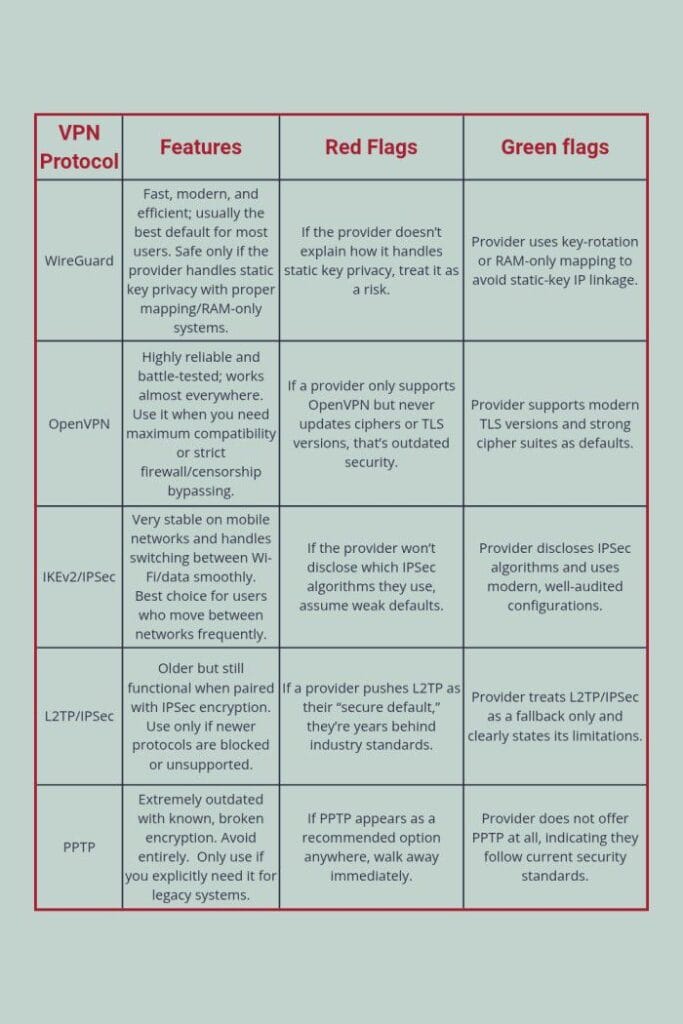
VPNs rely on specific protocols to create, secure, and maintain the encrypted tunnel.
Main Protocols are given below.
WireGuard
WireGuard is a modern VPN protocol designed to be fast, simple, and reliable. WireGuard uses the Noise_IK handshake system along with modern cryptography like Curve25519 for key exchange and ChaCha20-Poly1305 for encryption, making it both efficient and secure. It has a small codebase and this helps reduce bugs and makes auditing easier. A problem with WireGuard is that it uses a static device identity keypair. Thus, your device always presents the same public key to the server when establishing a connection. Since the same public key is presented by the user each time, this key could be used to identify a person. To prevent this, reputable VPN providers add privacy layers such as double NAT (NordVPN), RAM-only session mapping (Mullvad, IVPN), or immediate cleanup of mapping data (ProtonVPN, Surfshark, PIA, CyberGhost). With these protections in place, connection identifiers remain in the memory and are wiped out when the user disconnects. WireGuard delivers excellent speed, strong security, and solid privacy.
OpenVPN
OpenVPN is one of the most established VPN protocols and is built on top of the TLS/SSL security framework. It is the similar system used for HTTPS, making it highly vetted, stable, and trusted for encrypted communication. It authenticates servers using X.509 certificates. OpenVPN typically uses AES-256-GCM or ChaCha20-Poly1305 for encryption and attaches authentication tags to every packet to prevent tampering or injection. It can operate over UDP for performance or TCP when reliability is required.
UDP (User Datagram Protocol) is fast because it omits reliability checks and guarantees. There are no handshakes, no retransmission and no guarantee of arrival. If a packet is lost, UDP simply moves on. This doesn’t mean that there is no encryption. The VPN protocol performs the handshakes and creates the tunnel and encrypts the data packets. There is no additional encryption on these already encrypted data packets by UDP.
TCP (Transmission Control Protocol) builds a reliable, stateful connection with handshakes, acknowledgements, retransmission, and ordering. Since there is a double handshake and encryption (from VPN’s end and TCP’s end), TCP is slower but offers stable transport that guarantees data integrity and delivery.
Nearly all major VPN services offer OpenVPN alongside WireGuard, including NordVPN, Surfshark, ProtonVPN, Mullvad, PIA, and CyberGhost. OpenVPN is comparatively slower and heavier due to its large codebase, higher overhead, and slower handshakes.
IKEv2/IPSec
IKEv2/IPSec is a widely used VPN protocol combination known for its stability, especially on mobile devices. IKEv2 (internet key exchange version 2) handles negotiation and authentication using certificates or EAP. IPSec or internet protocol security (in ESP mode) encrypts and authenticates packets, typically using AES-GCM. One of IKEv2’s strengths is its MOBIKE support, which allows the tunnel to survive network changes without dropping, making it ideal for switching between WiFi and mobile data. However, IKEv2/IPSec has several drawbacks. It is easy to block because it relies on fixed ports (UDP 500/4500). It also depends heavily on each operating system’s IPSec implementation. IPSec is also very complex that misconfigurations are common. Despite these limitations, most major VPN services still offer IKEv2/IPSec alongside WireGuard and OpenVPN, including NordVPN, Surfshark, ProtonVPN, CyberGhost, and PIA.
L2TP/IPSec
L2TP/IPSec combines two layers: L2TP (Layer 2 Tunneling Protocol) encapsulates your data to form the basic tunnel and IPSec then encapsulates that entire L2TP packet again and encrypts it. This double wrapping makes the connection bulkier and noticeably slower. L2TP/IPSec is now considered a legacy option because it relies on old, OS-built implementations that haven’t seen meaningful updates in years. It also uses fixed ports (UDP 500 and 4500) and the ESP protocol, making it very easy for firewalls and networks to detect and block. While it still works and can be secure when configured properly. It is outdated, slow, and far less flexible than modern protocols. VPN providers mainly keep it around only for older devices or restrictive environments where newer protocols
PPTP
PPTP (Point-to-Point Tunneling Protocol) is one of the oldest VPN protocols and is essentially obsolete today. It uses simple tunneling and relies on MS-CHAPv2 for authentication — a method that has been completely broken for years. MS-CHAPv2 passwords can be cracked in minutes, and PPTP offers almost no real protection against modern attacks. It also uses GRE (Generic Routing Encapsulation), which is easy for firewalls to spot and block. While PPTP may deliver fast speeds due to its weak encryption, it is not secure and isn’t suitable for privacy or protection on today’s internet. The only reason it still exists is for compatibility with very old routers and legacy systems. No reputable VPN provider recommends using PPTP anymore.
Usual misconceptions about VPNs
One of the biggest misconceptions about a VPN is that it makes you anonymous. In reality, VPNs maintain your privacy rather than keep you anonymous. Let me explain.
Privacy means limiting who can see your data whereas anonymity means preventing anyone from linking that data or activity back to you.
Websites track you not just by your IP address, which VPNs successfully hide, but through other means. They identify you by your logged in accounts, cookies stored in your browser, app data, synced cloud profiles, and your device or browser fingerprint (typing speed, scroll pattern, screen size, GPU info, fonts, language, timezone). VPNs don’t really hide these.
Many also assume and claim that you can hide from governments when using a VPN. Frankly speaking, governments really don’t need to decrypt any VPN data to pinpoint you. Even a no-logs VPN can’t really protect you from being identified. They identify people through far simpler methods, like subpoenas served to the VPN provider, international data-sharing agreements, payment trails, app data, account identities, device telemetry, prior convictions or in the worst case scenario – device confiscation.
In reality, VPNs only prevent ISP tracking, stop public WiFi snooping, hide your IP from websites, and block local network monitoring. As a result ISPs, or scammers or WiFi admins can’t see your data. They also let you access sites or apps that your ISP or government has blocked. When you connect to a VPN server in another country, you browse the internet as if you’re physically in that country. So even if your country blocks something like Reddit or Telegram, a VPN basically teleports your browsing to a region where it isn’t blocked.
How to choose a good VPN
Aside from offers and costs, there are other factors to consider while selecting a VPN for our needs.
Proven “no logs” history
Anyone can just market themselves as a “no logs” VPN. What really matters is how true the claim is in practice.
ExpressVPN servers were seized in 2017 by Turkish investigators. Well, to the surprise of the investigators, they couldn’t find anything. That way, we know ExpressVPN keeps its promise.
On the contrary, the FBI obtained logs of a user for an investigation from PureVPN, who also claims itself to be a “no log” VPN.
These kinds of news can help you identify fake claims and reality. So do your own research before purchasing.
Transparent Ownership
Using a VPN requires you to trust them with your privacy and your data. Personally speaking, since trust is a mutual thing, I wouldn’t trust a shady VPN that won’t disclose the owners or parent company running it.
You don’t need to investigate everything. You can just verify the company’s legal registration in any official corporate database, confirm who actually owns the VPN and whether the parent company has a data-harvesting background. Make sure the business lists a verifiable physical address. If anything looks inconsistent, then perform optional checks like WHOIS history, past acquisitions, or LinkedIn employee listings.
Independent security audits
Independent audits are one of the strongest signals that a VPN is serious about security as they examine the VPN’s apps, infrastructure, and logging practices to verify that what the company claims is actually true. VPNs that avoid audits entirely or only publish vague “internal reviews” are just bad news and not at all trustworthy.
Firms like Cure53, Deloitte, AssuranceLab, and VerSprite usually conduct these assessments.
You need to check the scope of the audit, date and what was audited.
RAM-only server architecture
RAM-only servers are one of the strongest signs that a VPN takes privacy seriously. In a traditional setup, servers contain hard drives where logs, temporary files, or system data could be accidentally or unintentionally written and stored. With RAM-only architecture, there are no hard drives at all as the system runs purely on volatile memory.
RAM is volatile, short-term working memory that a device uses to temporarily store data while programs are running. Data in RAM is fast to access but erases completely when power is lost, which is why RAM-only VPN servers cannot retain logs after shutdown or reboot. Even if a server is seized, shut down, or physically removed, everything stored on it disappears instantly.
Unfortunately you cannot verify this. Only audits and provider transparency can verify this. Anything not backed by public technical documentation or audit evidence remains unverified.
Modern protocol support
A reliable VPN must support modern, secure protocols, not outdated or legacy ones. The current gold standards are WireGuard, OpenVPN, and IKEv2/IPSec. Any VPN relying mainly on PPTP or L2TP/IPSec as primary options is showing its age.
Genuine leak protection
A VPN is useless if it leaks your real IP, DNS requests, or WebRTC information. You can check this yourself
DNS leak test
Go to https://dnsleaktest.com after switching on your VPN. If your ISP’s DNS shows up, then your VPN is leaking.
IP leak test
Go to https://ipleak.net with your VPN connected. The IP shown should be your VPN’s IP not your original IP. If your original IP comes up, then the tunnel is broken.
WebRTC Test
Go to https://browserleaks.com/webrtc with your VPN connected. Check if your local IP or your public IP appears in your results. If it appears, then it shows your browser is leaking. If only your VPN IP appears, you are safe.
IPv6 leak test
Go to https://test-ipv6.com with your VPN connected. Under no circumstances, your original IP should be displayed. It is displayed, there is an IPv6 leak and your connection is bypassing VPN by IPv6. Block or disable IPv6 as needed.
Can you really trust VPNs?
At the end of the day, VPN is a purely trust based service. When you use a VPN, you are moving trust from your ISP to your VPN. Whether that’s an upgrade or just a new risk depends entirely on the VPN’s architecture, transparency, and track record.
A good VPN cannot read your encrypted traffic. But it can surely see your real IP address when you connect, your timestamps, your data volume, your destination IPs (if not encrypted with HTTPS/TLS), and your DNS queries (if they run their own DNS servers).
So the real question isn’t “can you really trust VPNs?” But it should be “Can you really trust this VPN?”
If the provider can’t answer that with verifiable actions, not promises, then you already have your answer.
We hope this blog post has helped you learn more about how a VPN works and what to watch out for when you are using a VPN.
Please give us an anonymous rating on how this article was.


Don’t chase updates. Let them come to you. We send one email a month with everything we published that month. And that’s all. Subscribe to the monthly newsletter.
FAQs
No. A VPN improves privacy, not anonymity. It hides your IP address from websites and encrypts traffic from your ISP, but websites can still identify you using logins, cookies, payments, and browser fingerprints.
A VPN hides your browsing destinations from your ISP or local network and your real IP address from websites.
Yes. Websites can track you through account logins, Cookies and trackers, Browser/device fingerprinting and Payment information. A VPN does not block these.
The VPN providers can see your real IP.
A VPN provider cannot read encrypted content (like HTTPS traffic), but it can potentially see your connection timestamps, data volume, destination IPs (if traffic isn’t end-to-end encrypted) and DNS requests (if it runs its own DNS). This depends heavily on the provider’s logging and architecture.
It means the provider claims not to store records linking users to their activity. However, this claim is only meaningful if backed by independent audits, court cases, transparent infrastructure (like RAM-only servers). Marketing alone is not proof.
The code base of WireGuard is lesser than protocols like OpenVPN. WireGuard uses a static device identity, which can theoretically enable tracking if mishandled. Reputable VPNs mitigate this using RAM-only session mapping, double NAT, immediate cleanup of session data. With these protections, WireGuard offers speed without sacrificing privacy.
RAM-only servers store data only in volatile memory, not on hard drives. When power is lost or a server reboots – all data disappears and no logs can persist. This greatly reduces the risk of stored user data.
You can run simple leak tests:
1) DNS leak test
2) IP leak test
3) WebRTC leak test
4) IPv6 leak test
If your real IP or ISP DNS appears in any one of the tests, then your VPN is leaking.
A VPN does not make you invisible to governments. Authorities often rely on subpoenas to VPN providers, payment trails, account data, device seizures. A VPN mainly protects against local surveillance, not legal identification.
A VPN is useful when using public Wi-Fi, avoiding ISP tracking, bypassing network censorship and protecting data in transit. It is not a tool for full anonymity.
Focus on proven no-logs history (refer news articles), transparent ownership, independent audits, RAM-only infrastructure, modern protocol support, reliable leak protection. Avoid choosing based on ads or discounts alone.


Your work has such a positive 🔥 impact on everyone who takes time to read
Thank you
This is incredibly well researched and presented! Amazing job
Thank you so much